Delete Memory
1. Choose a Deletion Method
MemOS Cloud currently supports the following three deletion methods. Choose one based on your scenario.
| Deletion method | Field | Use case |
|---|---|---|
| Delete specific memories | memory_ids[] | Delete one or more memories. The memory_id comes from the id field returned by search/memory or get/memory |
| Delete user memories | user_id | Clear all memories for a user in the current project |
| Delete Agent memories | agent_id | Clear all memories for an Agent in the current project |
- The three parameters are mutually exclusive. Only one deletion method can be used per call.
- Deletion only applies within the project scope of the current API Key. Before deleting, make sure the API Key, project, and target memories belong to the same project.
- Do not pass
conversation_id,knowledgebase_id, or other IDs. Deletion by those dimensions is not supported.
2. Delete Specific Memories
Use specific-memory deletion when you need to remove a memory that was written incorrectly, is outdated, was assigned to the wrong user, or must be deleted at the user's request.
2.1 Find the Memory to Delete
When you call Search Memory or get memories and find a memory that should be deleted, copy the id of that memory. This value is the memory_id used for deletion.
{
  "memory_detail_list": [
    {
      "id": "e2a7c194-7062-4fa5-a6c0-bbe554d05d60",
      "memory_key": "User ice cream preference",
      "memory_value": "[user opinion] The user likes ice cream.",
      "memory_type": "WorkingMemory",
      "memory_time": null,
      "conversation_id": "0610",
      "status": "activated",
      "confidence": 0,
      "tags": [
        "food",
        "preference",
        "ice cream"
      ],
      "update_time": 1761315278665,
      "relativity": 0.7524414
    }
  ]
}
2.2 Call the Delete API
import requests

API_KEY = "YOUR_API_KEY"
BASE_URL = "https://memos.memtensor.cn/api/openmem/v1"

data = {
  "memory_ids": ["6b23b583-f4c4-4a8f-b345-58d0c48fea04"]
}

res = requests.post(
  f"{BASE_URL}/delete/memory",
  headers={"Authorization": f"Token {API_KEY}"},
  json=data
)

print(res.json())
from memos.api.client import MemOSClient

client = MemOSClient(api_key="YOUR_API_KEY")

res = client.delete_memory(
  memory_ids=["6b23b583-f4c4-4a8f-b345-58d0c48fea04"]
)

print(res)
curl --request POST \
  --url https://memos.memtensor.cn/api/openmem/v1/delete/memory \
  --header 'Authorization: Token YOUR_API_KEY' \
  --header 'Content-Type: application/json' \
  --data '{
    "memory_ids": ["6b23b583-f4c4-4a8f-b345-58d0c48fea04"]
  }'
2.3 Verify the Result
The API returns data.success: true when the delete request succeeds. After deletion, call Search Memory again to check whether the memory still appears.
{
  "code": 0,
  "data": {
    "success": true
  },
  "message": "ok"
}
3. Delete All Memories for a User
When you need to clear all memories for a user in the current project, pass user_id.
user_idis the end-user ID whose memories you want to clear.- The API Key belongs to the project this user belongs to.
- You no longer need this user's fact, preference, Profile, Event Memory, skill, or tool memories in the current project.
import requests

API_KEY = "YOUR_API_KEY"
BASE_URL = "https://memos.memtensor.cn/api/openmem/v1"

data = {
  "user_id": "memos_user_123"
}

res = requests.post(
  f"{BASE_URL}/delete/memory",
  headers={"Authorization": f"Token {API_KEY}"},
  json=data
)

print(res.json())
from memos.api.client import MemOSClient

client = MemOSClient(api_key="YOUR_API_KEY")

res = client.delete_memory(user_id="memos_user_123")

print(res)
curl --request POST \
  --url https://memos.memtensor.cn/api/openmem/v1/delete/memory \
  --header 'Authorization: Token YOUR_API_KEY' \
  --header 'Content-Type: application/json' \
  --data '{
    "user_id": "memos_user_123"
  }'
After deleting all memories for a user, search again with the same user_id for that user's previous facts or preferences to confirm that old memories are no longer returned.
4. Delete All Memories for an Agent
When you need to clear all memories for an Agent in the current project, pass agent_id.
- This Agent has Independent Memory enabled.
agent_idis the Agent ID whose memories you want to clear.- The API Key belongs to the project this Agent belongs to.
- You no longer need this Agent's fact, preference, Profile, Event Memory, skill, or tool memories in the current project.
import requests

API_KEY = "YOUR_API_KEY"
BASE_URL = "https://memos.memtensor.cn/api/openmem/v1"

data = {
  "agent_id": "memos_agent"
}

res = requests.post(
  f"{BASE_URL}/delete/memory",
  headers={"Authorization": f"Token {API_KEY}"},
  json=data
)

print(res.json())
from memos.api.client import MemOSClient

client = MemOSClient(api_key="YOUR_API_KEY")

res = client.delete_memory(agent_id="memos_agent")

print(res)
curl --request POST \
  --url https://memos.memtensor.cn/api/openmem/v1/delete/memory \
  --header 'Authorization: Token YOUR_API_KEY' \
  --header 'Content-Type: application/json' \
  --data '{
    "agent_id": "memos_agent"
  }'
After deleting all memories for an Agent, search again with the same agent_id to confirm that old memories for that Agent are no longer returned.
5. Delete Memories in the Console
If you only need to delete one or a few memories temporarily, you can delete them directly in the console:
- Log in to the MemOS Console and make sure the current project is the one you want to operate on.
- Go to "Memory List" and use the search box, subject ID, subject type, or time range to find the target memory.
- Click "View Details" and check the memory ID and memory content. Make sure it is not a similar memory under the same user.
- Click "Delete" and confirm in the second confirmation dialog. To delete multiple memories, select multiple records first, then click "Batch Delete".
- Refresh the list after deletion, or search again with the same conditions to confirm that the memory no longer appears.
memory_id values copied from logs or search results, call the delete/memory API instead.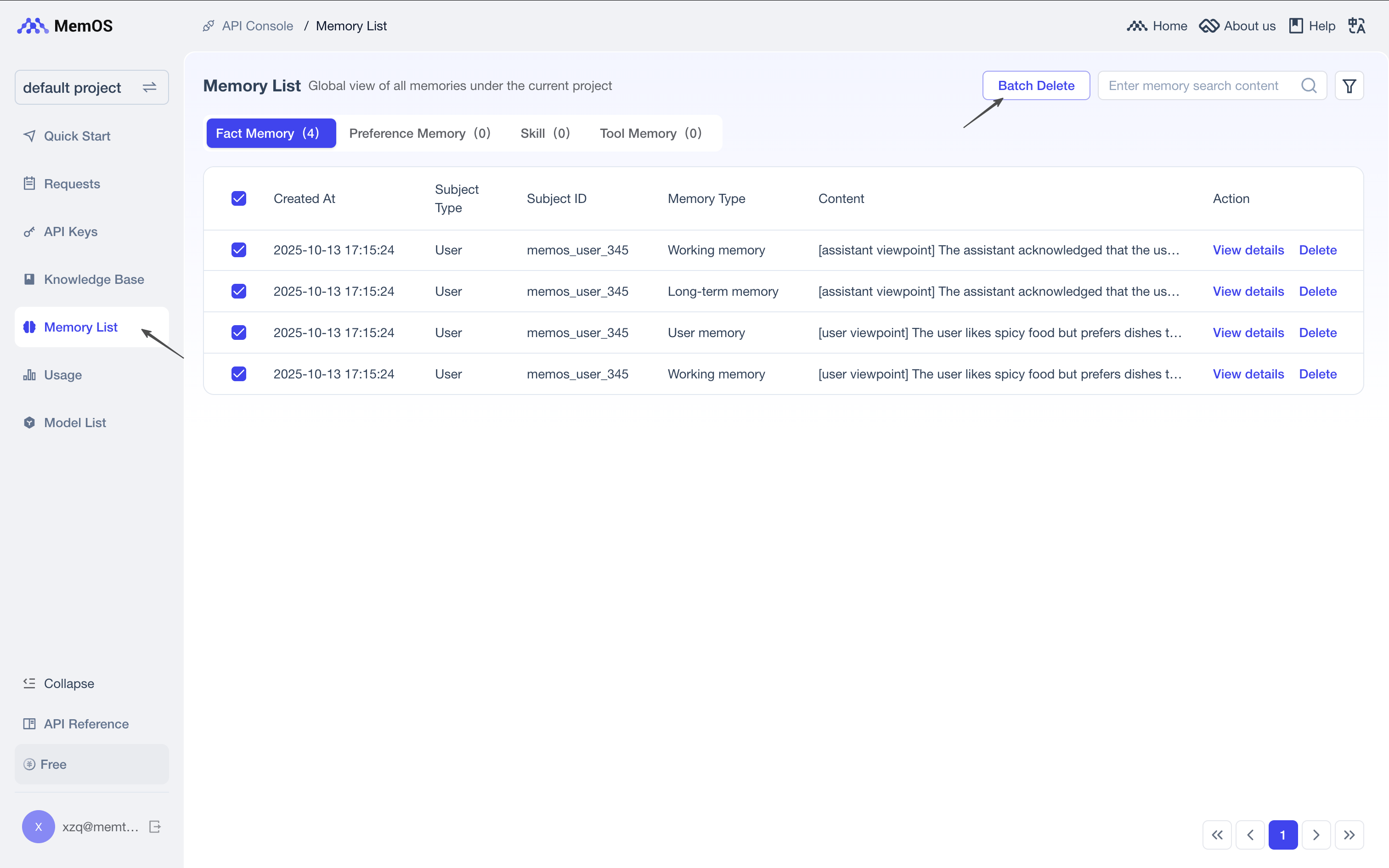
6. Common Errors and Troubleshooting
| Error code | Common cause | How to fix |
|---|---|---|
40000 | The request body is invalid, or unsupported fields are passed together | Pass only one of memory_ids, user_id, or agent_id (the three are mutually exclusive); memory_ids must be a non-empty string array |
40002 | A required field is empty | Check whether memory_ids / user_id / agent_id is missing, or whether you passed an empty string or empty array |
40103 / 40132 | The API Key is invalid, expired, or cannot access the current project | Go back to Project Configuration and check whether the current project matches the API Key |
40306 | Delete-memory authentication failed | Make sure the memory belongs to the project of the current API Key and that you have permission to delete it |
40307 | The memory_id does not exist | Get the latest id from search/memory or get/memory; do not use conversation_id, user_id, or a knowledge base ID |
40308 | The user_id or agent_id does not exist | Confirm that this user/Agent has written memories in the current project. If passing agent_id, confirm that this Agent has independent memory enabled and has written memories |
For more error code details, see Error Codes.
Need the complete field list, request format, and response format? See the Delete Memory API documentation.