Add Feedback
1. When Should You Add Feedback?
MemOS feedback receives natural-language feedback from users about model answers, knowledge content, or historical memories, then automatically corrects and updates memories. You do not need to manually locate a specific memory item. Just pass the user's feedback to add/feedback.
| Comparison | Natural-language feedback | Direct memory edit |
|---|---|---|
| How to use | Describe the problem or correction in natural language | Specify a memory item and edit it directly |
| User barrier | Low, suitable for non-technical users | Higher, usually handled by developers or admins |
| System role | The system parses, locates, links, and updates automatically | Humans lead the update |
| Typical use | Conversation correction, outdated knowledge, business rule changes | Precise revision, structured maintenance |
2. Key Parameters
- Feedback content (
feedback_content): the user's natural-language feedback on a model answer, knowledge content, or memory result. - User ID (
user_id): the unique user identifier associated with the feedback. - Conversation ID (
conversation_id): the unique conversation identifier associated with the feedback, used to provide context. - Knowledge base scope (
allow_knowledgebase_ids): the list of knowledge bases that new memories from this feedback can be written into.
3. How It Works
In a chatbot scenario, the user can click "report an issue" below a model answer, enter feedback, and submit it.
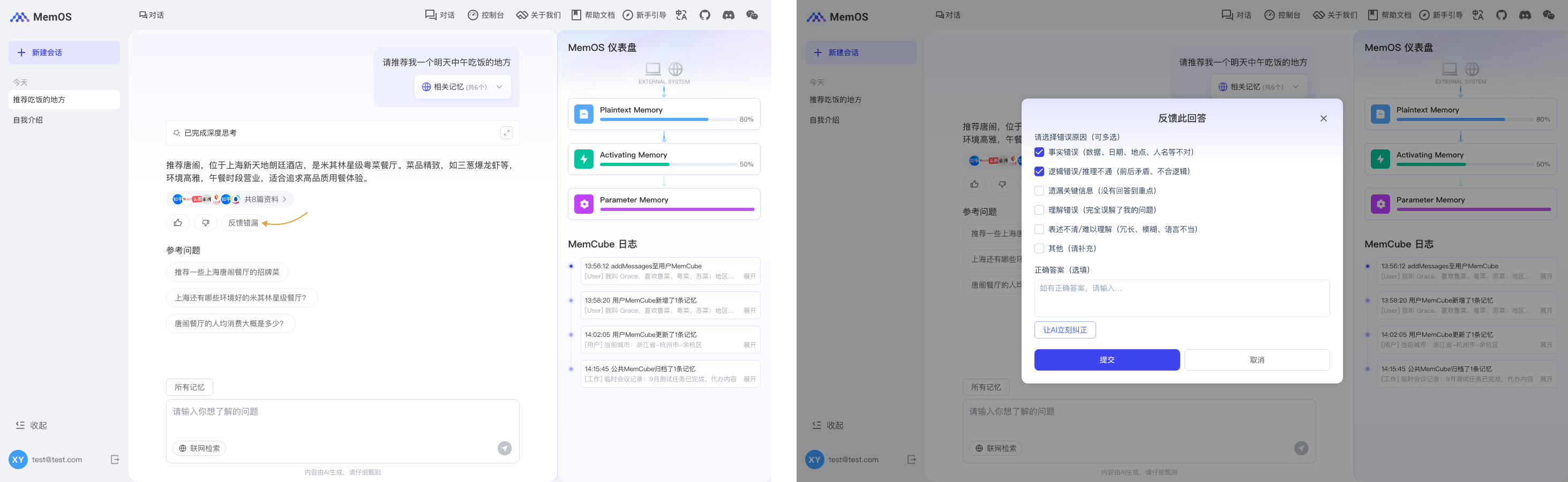
Based on the feedback content, your backend calls the MemOS add/feedback API and triggers a memory update.
- Validity analysis: parse the feedback with the current conversation context and decide whether it is valid and related to the conversation.
- Update type recognition: classify the requested update as keyword replacement or semantic update.
- Memory update: write new memories and update or override existing memories that are conflicting, outdated, or corrected.
4. Quick Start
Semantic Update of Knowledge Base Memory
When enterprise policies, knowledge base content, or business rules change, you can pass the user's natural-language feedback directly to MemOS. The system generates a new high-priority memory.
Submit Natural-language Feedback
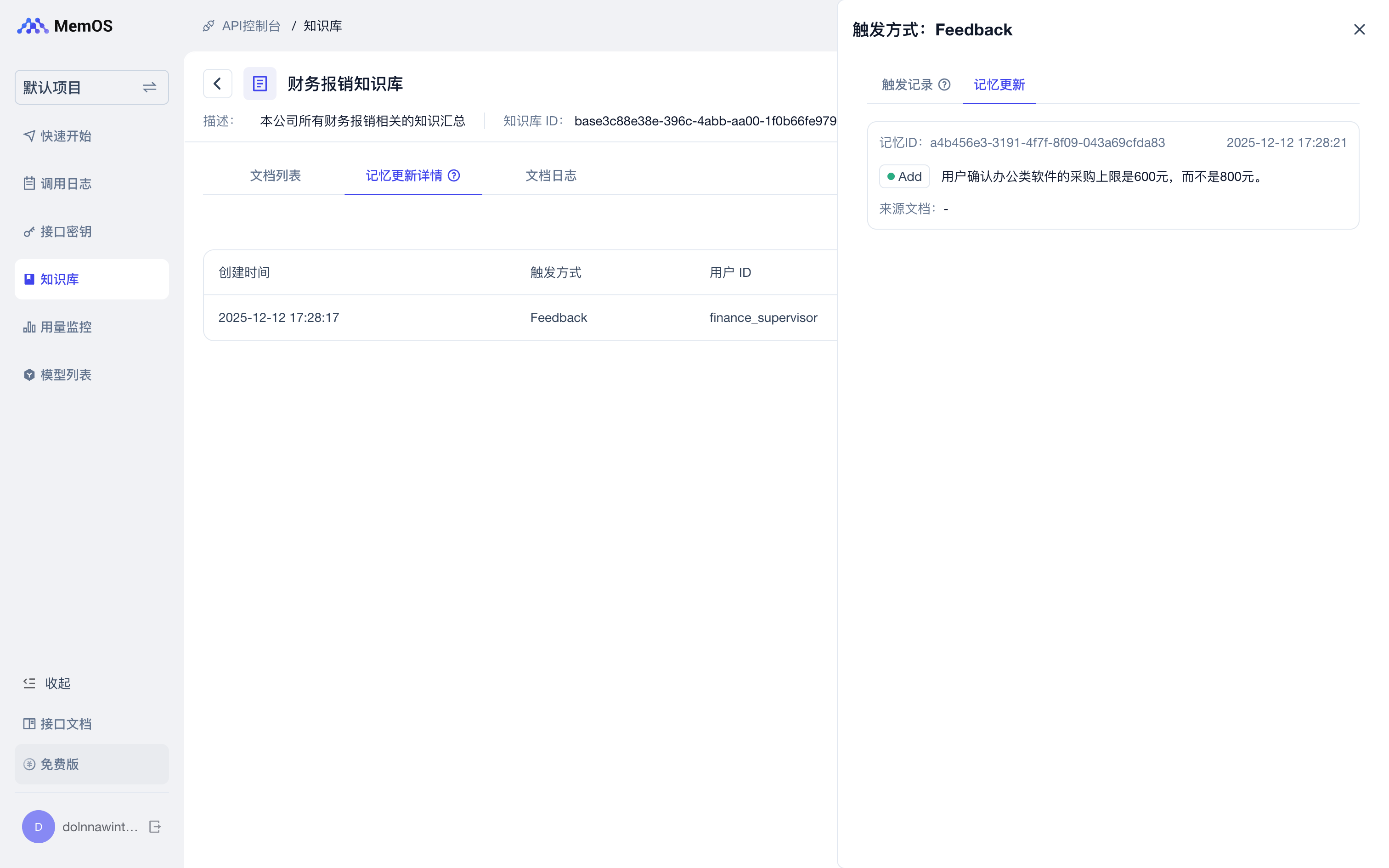
A finance manager gives feedback in the conversation: the purchase limit for office software should be 600 CNY, not 800 CNY.
import requests

API_KEY = "YOUR_API_KEY"
BASE_URL = "https://memos.memtensor.cn/api/openmem/v1"

data = {
  "user_id": "memos_user_123",
  "conversation_id": "memos_feedback_conv",
  "feedback_content": "The purchase limit for office software is 600 CNY, not 800 CNY.",
  "allow_knowledgebase_ids": ["basee5ec9050-c964-484f-abf1-ce3e8e2aa5b7"]
}

res = requests.post(
  f"{BASE_URL}/add/feedback",
  headers={"Authorization": f"Token {API_KEY}"},
  json=data
)

print(res.json())
from memos.api.client import MemOSClient

client = MemOSClient(api_key="YOUR_API_KEY")

res = client.add_feedback(
  user_id="memos_user_123",
  conversation_id="memos_feedback_conv",
  feedback_content="The purchase limit for office software is 600 CNY, not 800 CNY.",
  allow_knowledgebase_ids=["basee5ec9050-c964-484f-abf1-ce3e8e2aa5b7"]
)

print(res)
curl --request POST \
  --url https://memos.memtensor.cn/api/openmem/v1/add/feedback \
  --header 'Authorization: Token YOUR_API_KEY' \
  --header 'Content-Type: application/json' \
  --data '{
    "user_id": "memos_user_123",
    "conversation_id": "memos_feedback_conv",
    "feedback_content": "The purchase limit for office software is 600 CNY, not 800 CNY.",
    "allow_knowledgebase_ids": ["basee5ec9050-c964-484f-abf1-ce3e8e2aa5b7"]
  }'
Verify the Update Through Search
After feedback is processed, when another user searches for the software reimbursement policy, the result can include a new high-priority memory: the purchase limit for office software is 600 CNY, not 800 CNY.
import requests

API_KEY = "YOUR_API_KEY"
BASE_URL = "https://memos.memtensor.cn/api/openmem/v1"

data = {
  "user_id": "memos_user_123",
  "conversation_id": "memos_feedback_check",
  "query": "Help me check the reimbursement limit for software purchases.",
  "knowledgebase_ids": ["basee5ec9050-c964-484f-abf1-ce3e8e2aa5b7"]
}

res = requests.post(
  f"{BASE_URL}/search/memory",
  headers={"Authorization": f"Token {API_KEY}"},
  json=data
)

print(res.json())
from memos.api.client import MemOSClient

client = MemOSClient(api_key="YOUR_API_KEY")

res = client.search_memory(
  user_id="memos_user_123",
  conversation_id="memos_feedback_check",
  query="Help me check the reimbursement limit for software purchases.",
  knowledgebase_ids=["basee5ec9050-c964-484f-abf1-ce3e8e2aa5b7"]
)

print(res)
curl --request POST \
  --url https://memos.memtensor.cn/api/openmem/v1/search/memory \
  --header 'Authorization: Token YOUR_API_KEY' \
  --header 'Content-Type: application/json' \
  --data '{
    "user_id": "memos_user_123",
    "conversation_id": "memos_feedback_check",
    "query": "Help me check the reimbursement limit for software purchases.",
    "knowledgebase_ids": ["basee5ec9050-c964-484f-abf1-ce3e8e2aa5b7"]
  }'
Output
"memory_detail_list": [
  {
    "id": "8a4f3d2e-c417-4e53-bc25-54451abd5ac8",
    "memory_key": "Software purchase reimbursement policy trial version",
    "memory_value": "The policy requires the purchase limit for office software to be 800 CNY and applies to document editing and spreadsheet tools.",
    "memory_type": "LongTermMemory",
    "conversation_id": "default_session",
    "relativity": 0.8931847
  },
  {
    "id": "a72a04d1-d7ba-4ebd-9410-0097bfa6c20d",
    "memory_key": "Office software purchase limit",
    "memory_value": "The user confirmed that the purchase limit for office software is 600 CNY, not 800 CNY.",
    "memory_type": "WorkingMemory",
    "conversation_id": "memos_feedback_conv",
    "relativity": 0.7196722
  }
]
The Knowledge Base console also shows knowledge base memories corrected or supplemented through natural-language interaction.
Keyword Replacement Memory
If the user clearly indicates that a name, rule, or field should be replaced globally, you can also describe the replacement intent in natural language.
data = {
  "user_id": "memos_user_123",
  "conversation_id": "memos_feedback_conv",
  "feedback_content": "From now on, I changed my name. Replace User 1 with User 2 everywhere.",
  "allow_knowledgebase_ids": ["basee5ec9050-c964-484f-abf1-ce3e8e2aa5b7"]
}
5. Common Errors and Troubleshooting
| Error Code | Common Cause | How to Fix |
|---|---|---|
40000 | The request JSON structure is invalid, or a field type is incorrect | Check whether feedback_content is a string and whether allow_knowledgebase_ids is a string array |
40002 | A required field is empty | Check that user_id, conversation_id, and feedback_content are all provided and non-empty |
40011 | conversation_id is too long | Use a short ID. Do not put full conversations, user input, or JSON into conversation_id |
40305 | A single request exceeds the token limit | Shorten the feedback content and keep the key correction information |
40309 | Token usage exceeds the per-time-window limit | Lower feedback write concurrency and retry in batches |
50123 | The knowledge base is not associated with the current project | Go to Project Configuration and confirm the knowledge base is associated with the project that owns the API Key |
50145 | Failed to save feedback and write memory | Check the request content and retry later. If it persists, contact support |
Need the complete field list, request format, and response format? See the Add Feedback API documentation.